Introducing LGM Finder, our new ABM tool integrated directly into La Growth Machine... 🔍
We are thrilled to announce the release of LGM Finder, our new turnkey ABM solution! Now, take your segmentation to the next level and identify the leads within companies that match your ideal client profile—all without leaving La Growth Machine!
Contact leads that match your ICP 🎯 Why waste time with leads that don't meet your expectations? With advanced segmentation capabilities, LGM Finder helps you pinpoint the perfect leads in your target companies, ensuring your campaigns are more effective and focused.
Little extra: this is 100% GDPR-compliant as we rely on comprehensive and always up-to-date data!
How does it work?
Play with filters: search for companies that match your ideal customer profile by filtering by industry, size, or location.
Find the right contacts: identify the right contacts within these companies and select the most interesting ones for you.
Launch your campaign: import these contacts into a new audience and launch your hyper-personalized campaign.
Just a few weeks after launching the calls, we decided to push hyper-personalization even further with the introduction of a brand new manual task: Custom Messages 🎉 Now, you can choose the messages you want to personalize or review after your campaign has been launched!
Automating your prospecting does not mean losing personalization, quite the opposite!
Sending personalized messages to your prospects increases your chances of response, and enables you to build strong and durable relationships. With Custom Messages, personalize your messages even after your sequence has been launched, and adapt your communication for each lead based on the evolution of their needs and the most recent information.
So, how does it work?
Build your sequence from scratch or use any template from the catalog.
Choose the message to personalize in your sequence by clicking on "Customize before sending".
Launch your campaign.
When it’s time to write your message, the sequence stops to let you take action. You can see all pending tasks in the "Tasks" interface.
It's all new: you can now do Social Warming on LinkedIn, 100% automatically directly in La Growth Machine. The "Like" and "Follow" blocks have been added to the feature catalog.
Say goodbye to cold prospecting 👋 Now make yourself known to your target even before your first interactions!
Why using it?
Your prospect begins to recognize you gradually.
This makes them more inclined to respond or start a conversation.
They are more likely to trust you, especially compared to your competitors. Result: you significantly improve your conversion rate!
So, how does it work?
Choose the dedicated Social Warming template or build your sequence from scratch and add a "Like" and a "Follow" blocks.
Make sure to set up the right time variable for the "Like" block.
Now that you can add call tasks to your LGM campaigns, we've added a handy update to ensure you don't miss any of them: receive an email each morning with all the new calls to make and messages to review!
Prepare your keyboard, there's no reason to miss a chance to connect with your leads!
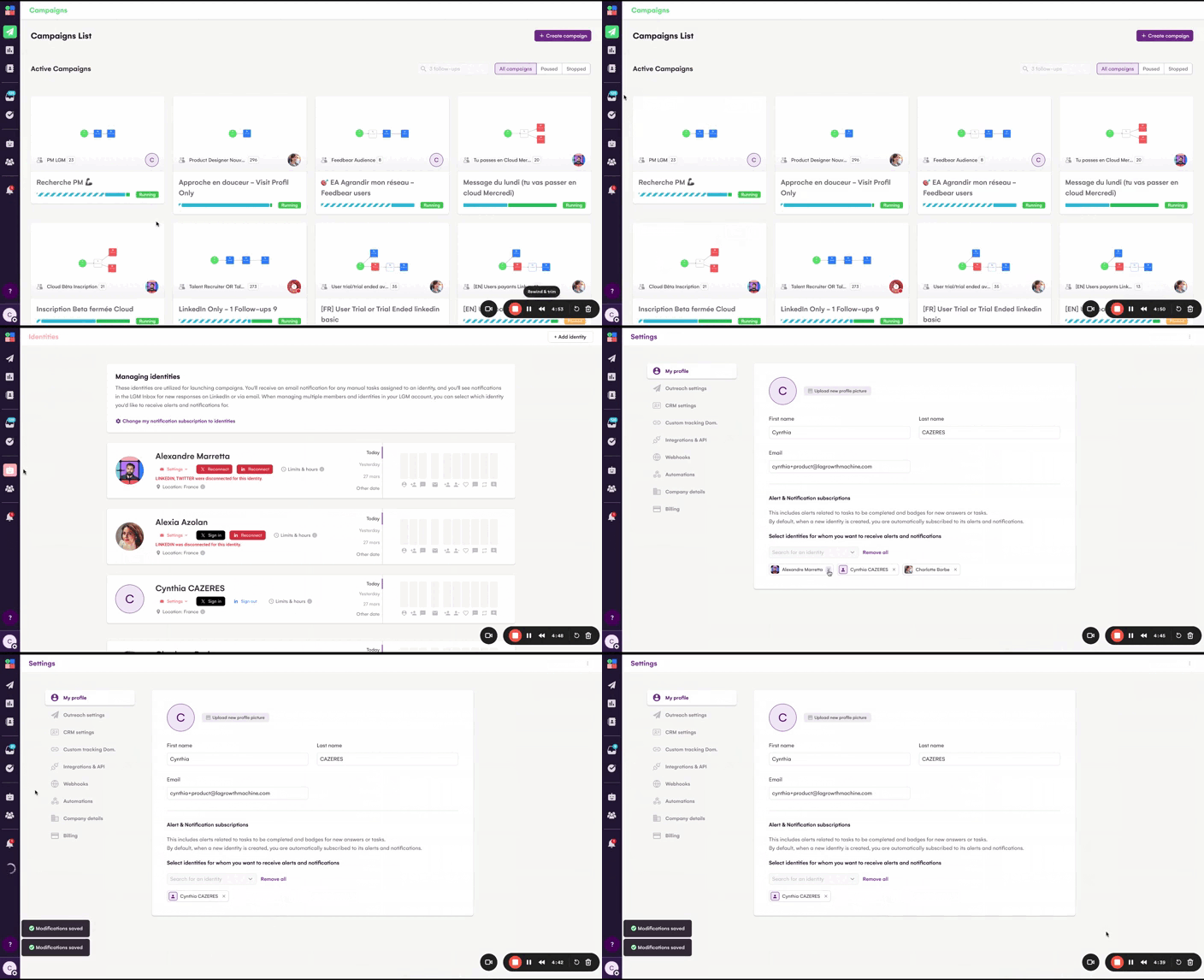
🔔 Manage you identity alerts subscriptions
If there are multiple members logged into the same account, you might receive an email with new tasks to do from a colleague or see a persistent notification bubble for unread messages in the LGM inbox regarding an identity that isn't yours.
🙅♀️ Now, choose which emails and notifications you want to receive, making sure they're actually relevant to YOU.
Ps: If your colleague is on leave and you need to take over their client portfolio, no worries, just subscribe to notifications for their identities and in less than 2 seconds, you'll have access to their alerts again.
💪 Others fixes and Improvements
You can import the same SalesNavigator list into the same audience again
Fixed detection of LinkedIn Premium and SalesNavigator accounts
Fixed imports of people who follow my company and participate into an event
Fixed synchronization of information in CRMs after enriching a lead
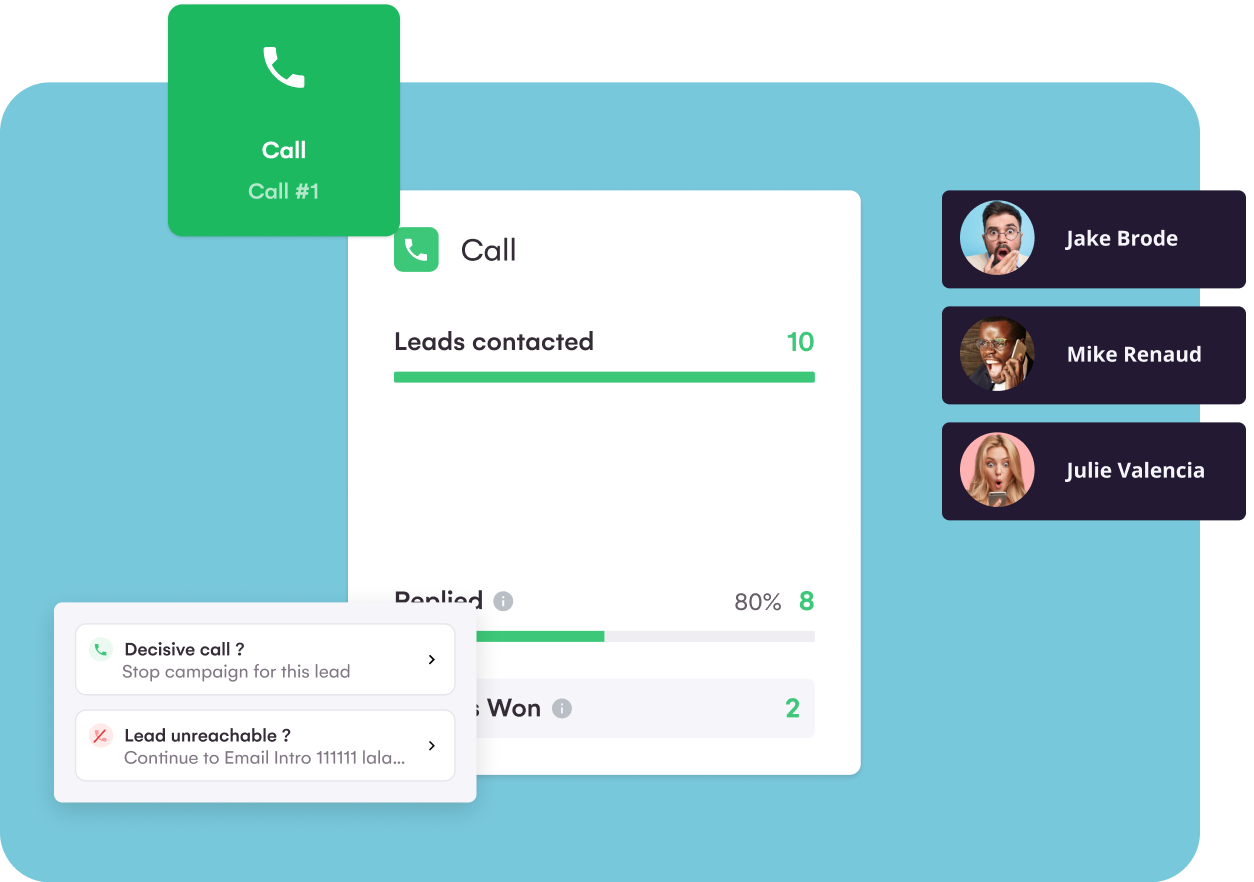
At La Growth Machine, we truly believe that a human approach is game-changing when it comes to prospecting, especially when you're reaching out to a high-potential audience. That's why we're thrilled to announce that we just released a new manual task: calls!
But why implementing manual tasks in an automation tool? 🤔 Adding a little personal touch can make all the difference and help you to create powerful conversations with your prospects. With manual call tasks, take personalization to the next level, while continuing to automate time-consuming processes 🚀
So, how does it work?
Build your sequence or use a template that includes a "Call" block.
Launch your campaign.
When a call task comes up, the sequence stops to let you make the call. You can see all pending call tasks in the "Tasks" interface.
LGM's Latest update: Deeper Analysis, variables translation and more! 🤩
🚀 Refine Your Campaign Analysis Even Further
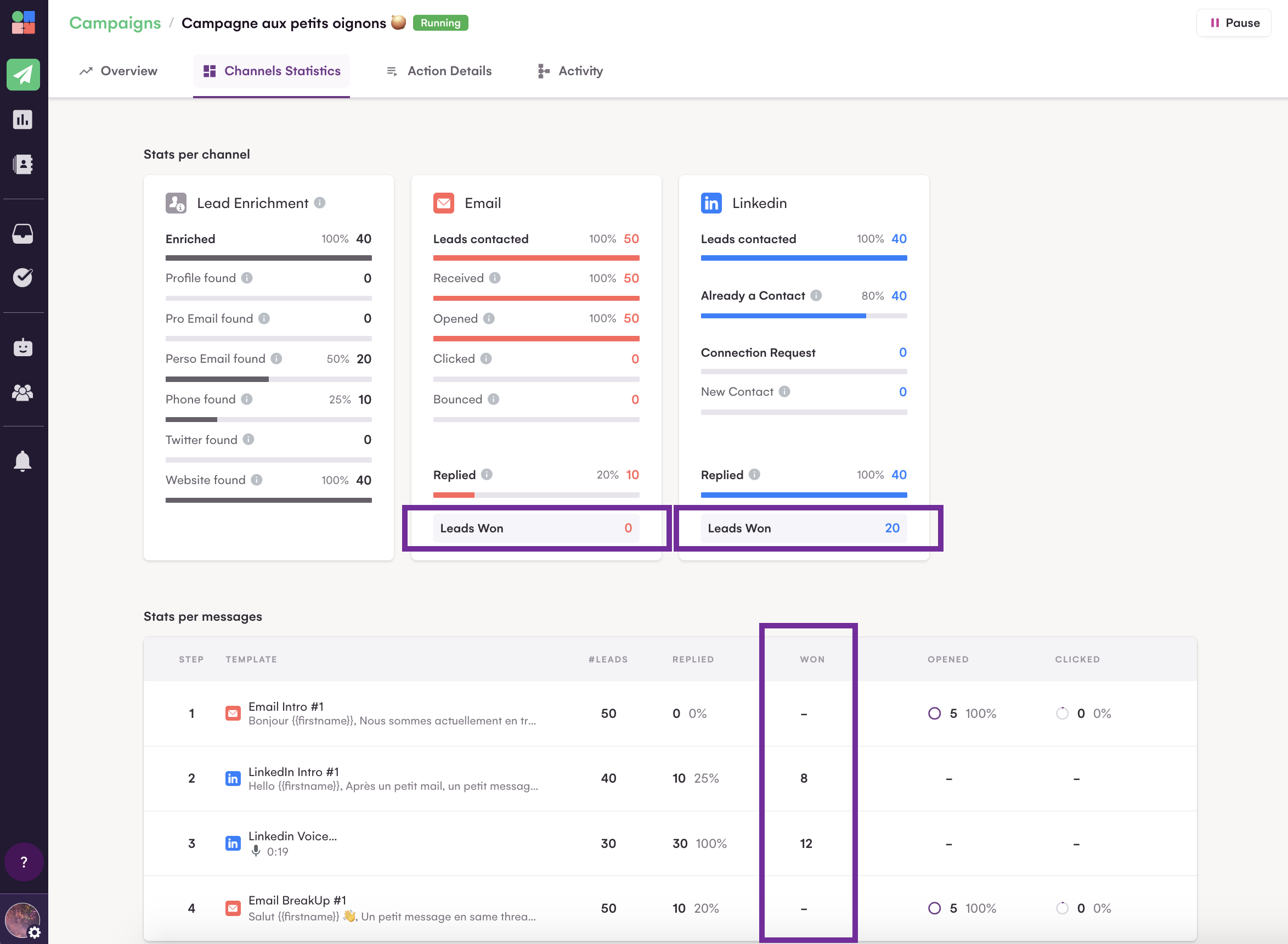
Exciting news for all users! The "Statistics" tab in your campaigns has received a significant upgrade. 🚠
Starting today, you'll have the ability to track the number of leads that have successfully converted from each channel or message. 🤩 This enhancement not only makes it easier to pinpoint the most effective channel in terms of response rate but also helps in identifying which one leads to the highest conversion rates.You can now determine if your leads convert more after the 2nd or 3rd message.
In essence, these new analytical capabilities offer a more granular view of your campaign's performance, enabling you to fine-tune your prospecting strategies more effectively.
It's time to ignite your prospecting efforts with these powerful insights! 🔥🙂
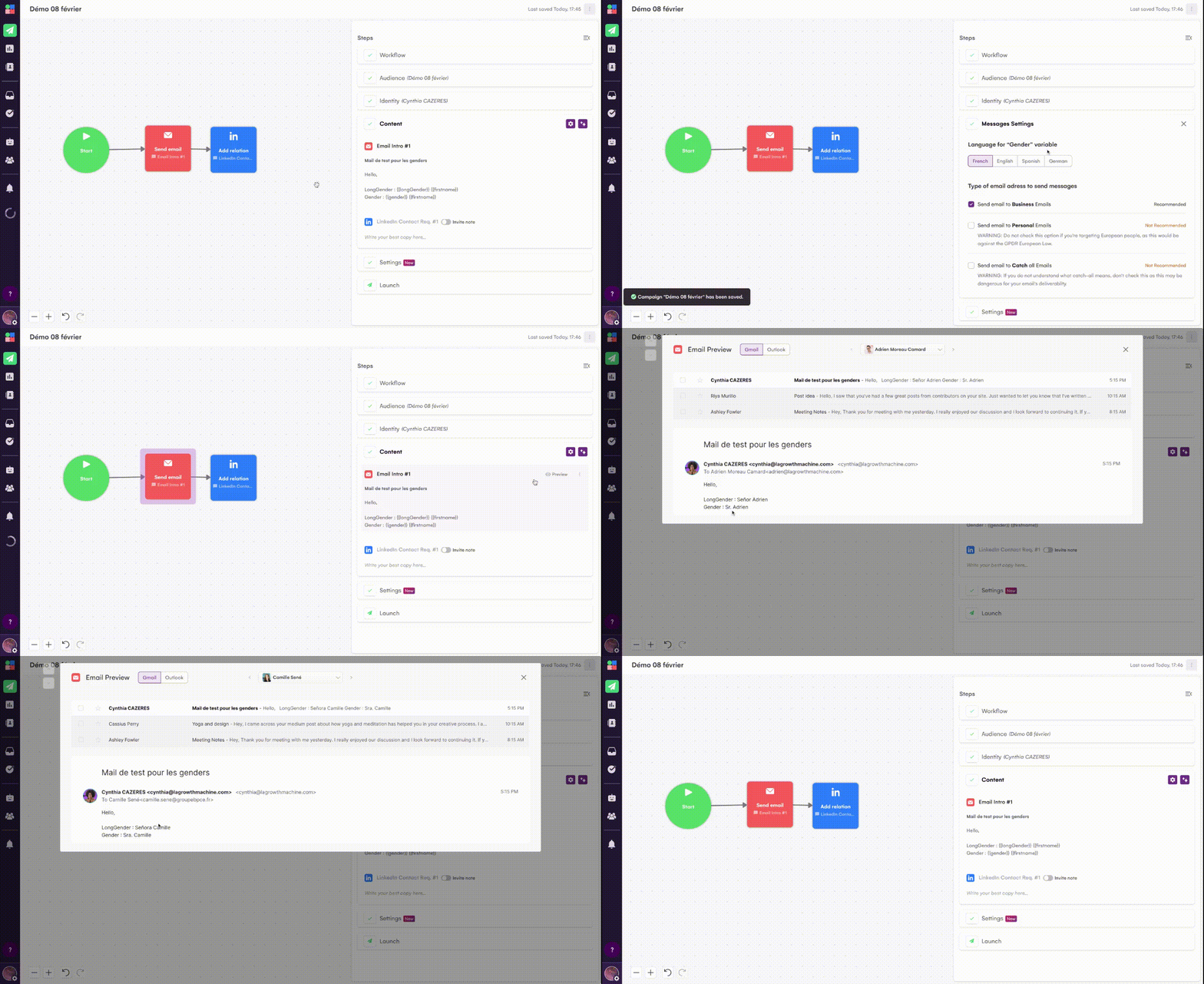
🎤 Gender variables are now translated into Spanish and German!
Customizing messages is crucial when conducting outreach. That's why, at La Growth Machine, we encourage you to use variables in your messages.
Following your feedback, we realized that limiting translations to French and English could be restrictive. Some of you had to resort to using custom variables to translate genders. 👇
But not anymore – we now translate them into German and Spanish as well! Enjoy 😉
Correcting Character Overruns in LinkedIn Invites with The Growth Machine
Including a personalized invitation note in your LinkedIn contact request is something we definitely recommend!
You must certainly be aware (or perhaps not) that the number of characters allowed in invitation notes depends on your LinkedIn account type (Basic or Premium). La Growth Machine now adjusts the number of allowed characters accordingly.
But here's the thing, with LinkedIn's 200 or 300 character limit (depending on your account) and your eager desire to use up every possible character, sometimes it can backfire. A longer-than-usual variable (like a double-barreled first name) and bam 💥, your campaign gets stuck on that lead. Annoying, right? 😑
🤿 So, we dove into the issue and found THE solution!
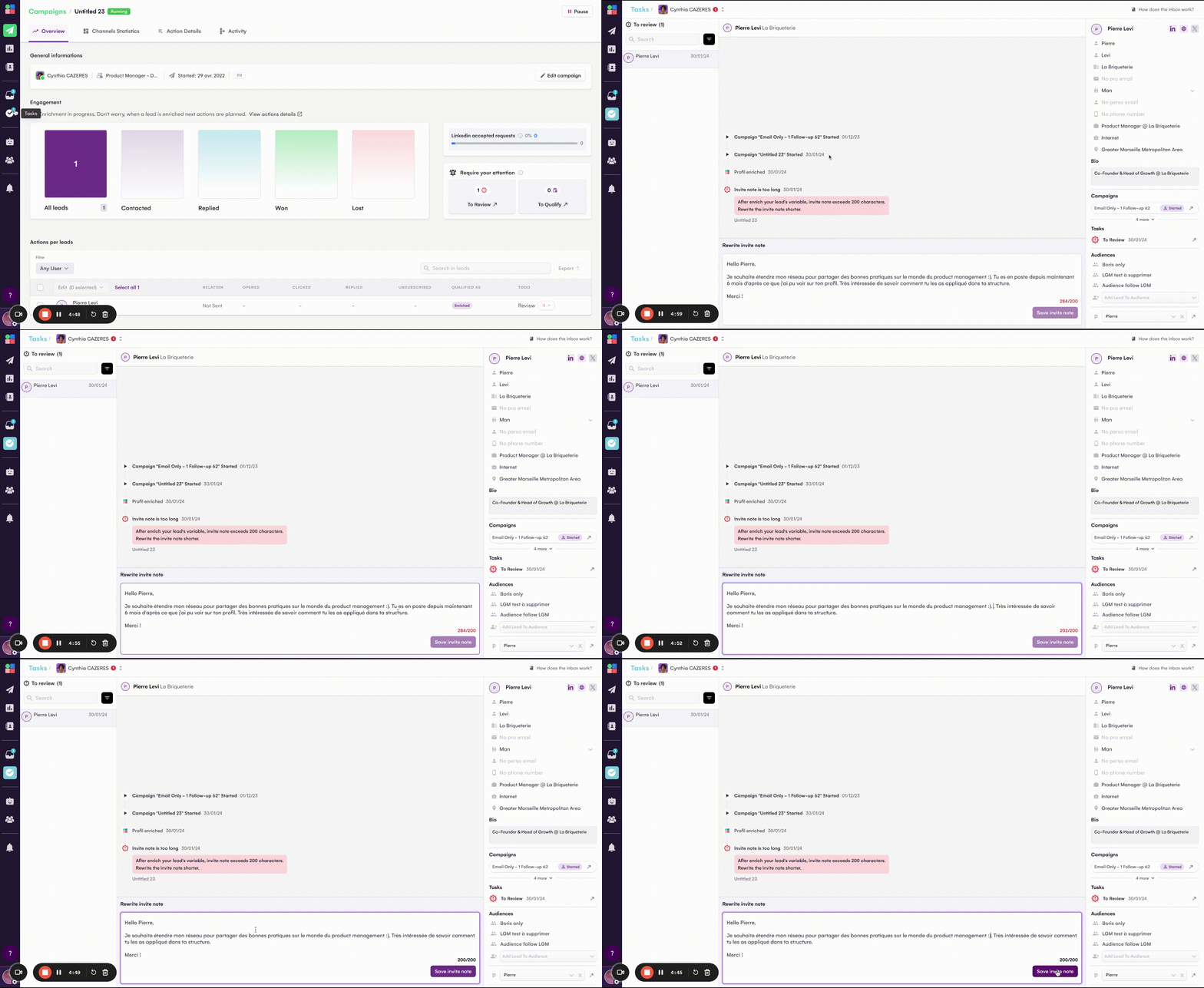
Once your campaign is up and running, La Growth Machine detects errors and allows you to correct them!
Here's how it works:
Launch your campaign
If an anomaly is detected, it's flagged under "Require your attention", to correct it click on "To review"
Modify your invitation text to reduce the character count
This way, your campaign can smoothly continue on its way 💪
Celebrating a Year of Growth: New Features and a Festive Surprise! 🎄
La Growth Machine is wrapping up the year with a bunch of awesome new features we've released in recent months:
Personalized Voice Messages
Magic Messages
Importing leads from your CRM
Importing leads based on a LinkedIn intent
Qualifying leads right from your inbox
Automatically detecting Out Of Office messages
Adding Zapier Triggers
New integrations
Refreshed interfaces
AND MORE!
Guess what? It's all thanks to you! We're incredibly grateful for your feedback, which helps us keep improving and shaping our multi-channel prospecting solution.
To make your holiday season even merrier, we've got a little surprise just for you! We've added two new variables for your use in automated voice messages: 🎄 Happy holidays ✨ Best wishes
(Available in French, English, German and Spanish)
It's super simple:
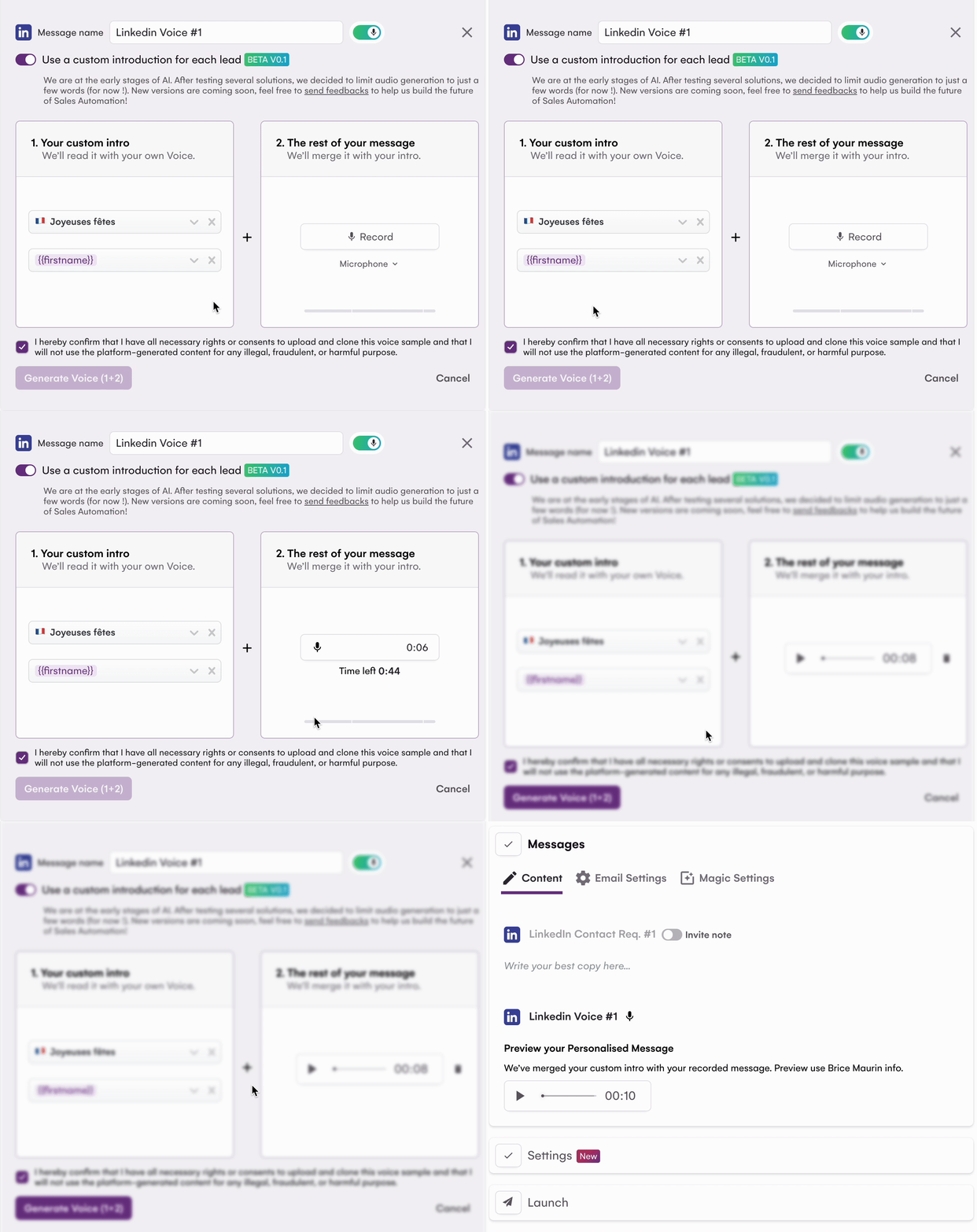
Choose your variable intro, and our AI will generate the audio.
Record the rest of your message. We'll blend your message and send a personalized Voice message to every lead in your campaign.
At La Growth Machine, we always keep a close eye on technological advancements, emerging innovations in the market, and the needs of our users.
😉 We understand that copywriting can often be the trickiest part, even though it's one of the most crucial components for starting a conversation.
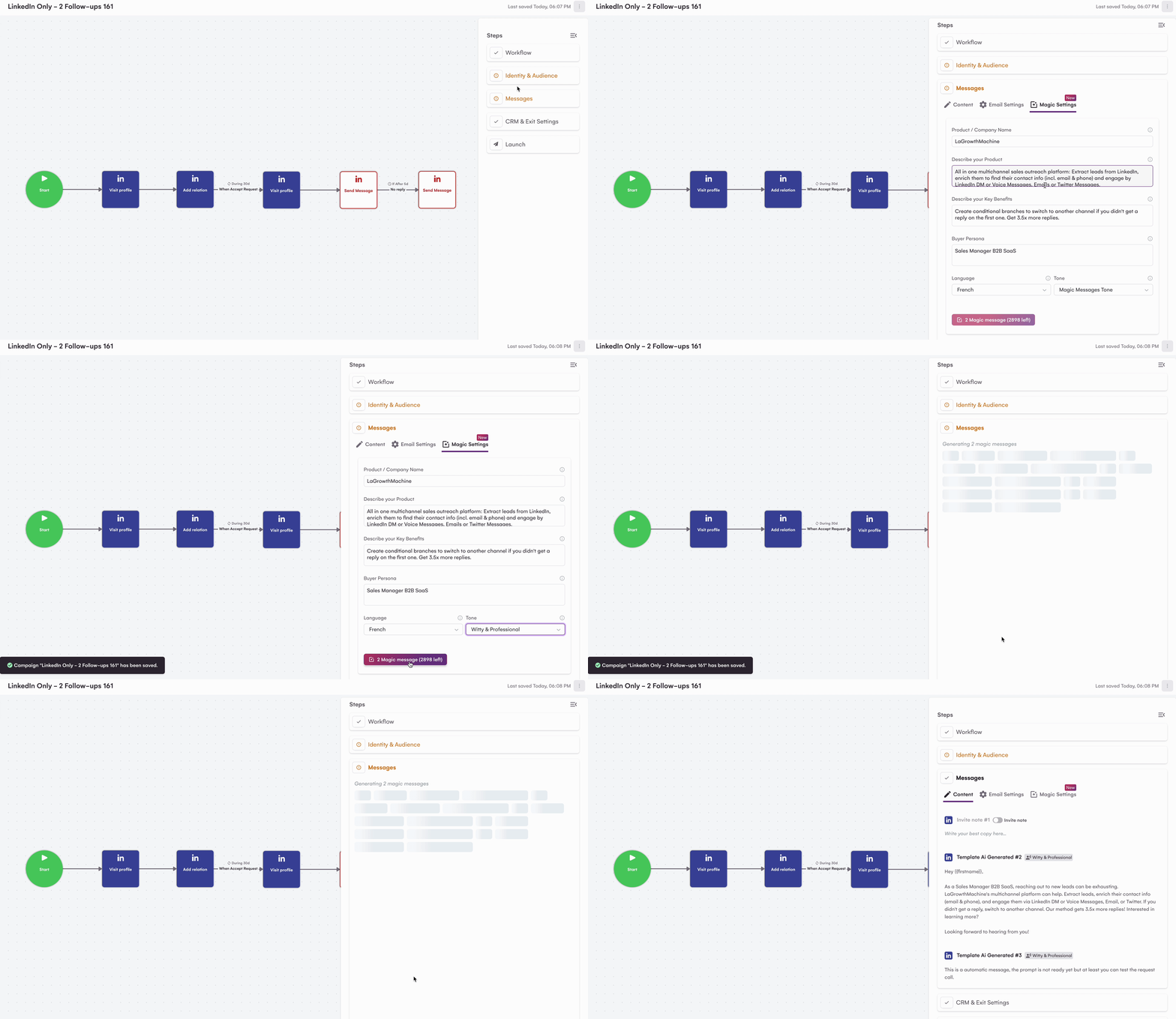
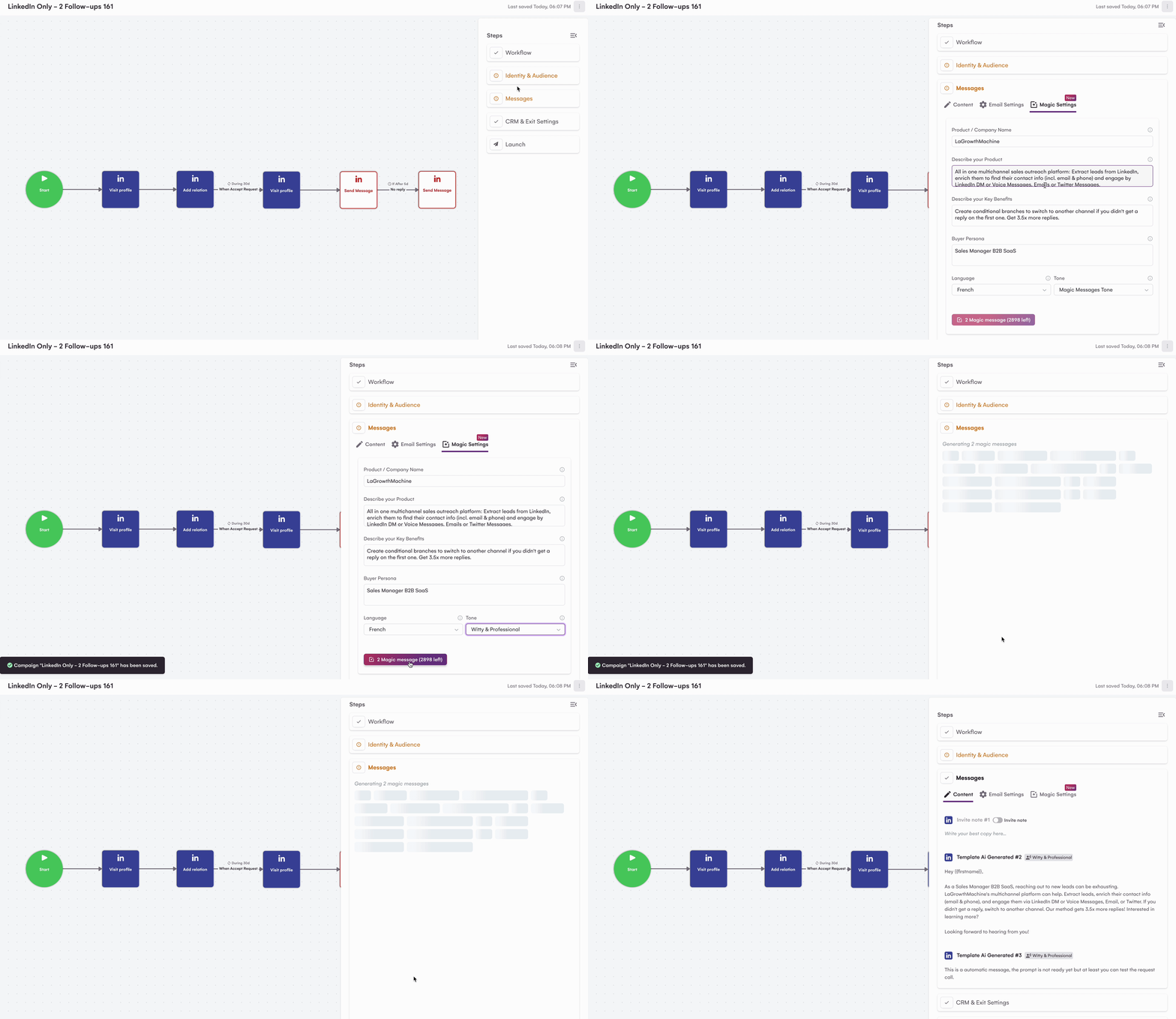
So, when AI entered our lives, our first AI integration at LGM took the form of Magic Messages. 🪄
The promise: Generate all the messages for your LinkedIn and Email campaigns with just one click. Up to now, Magic Messages V1 relied on a ChatGPT3.5 prompt.
After conversing with our users, we thought we could make this feature even more fantastic by enhancing the prompt to provide even more tailored copywriting.
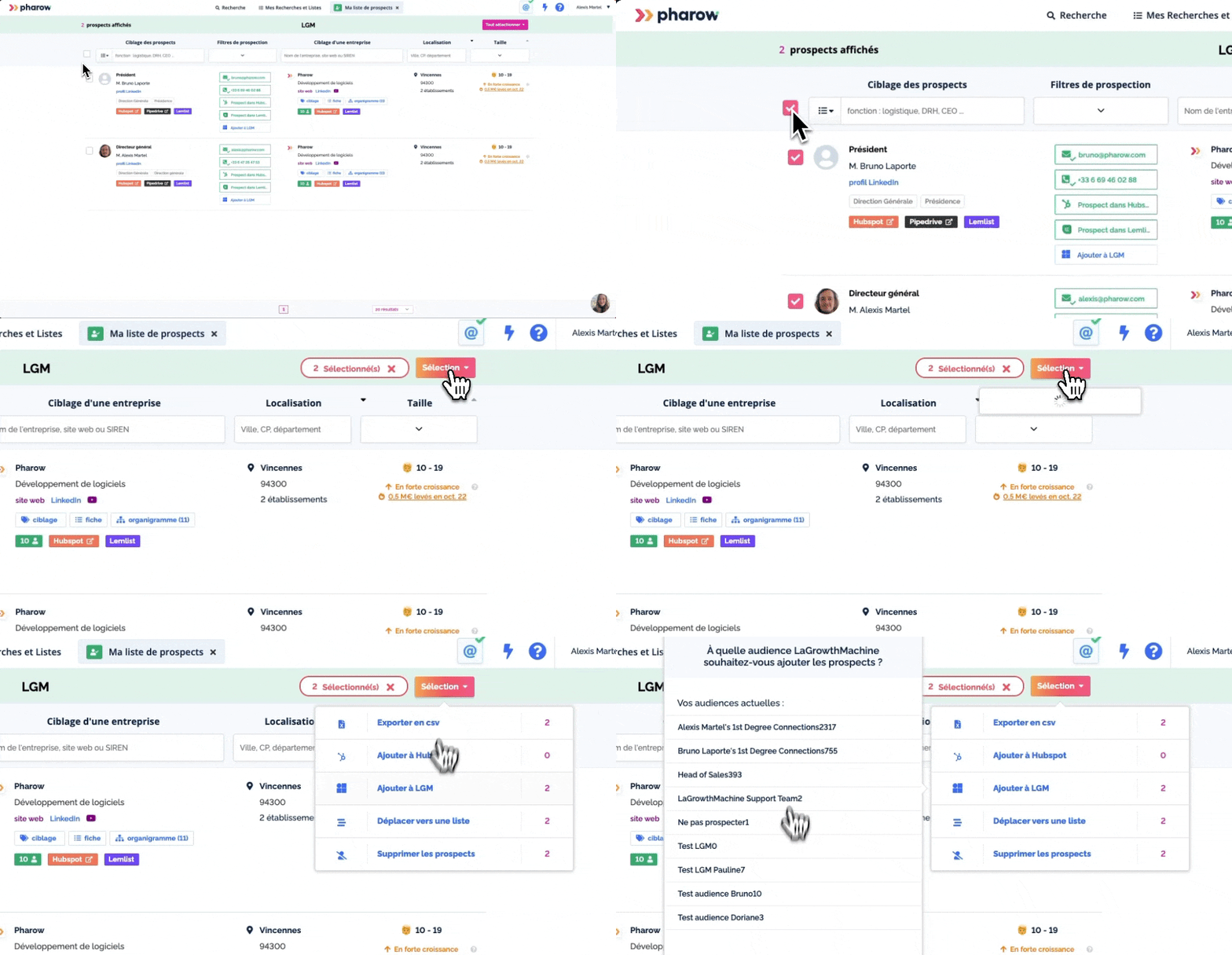
Pharow x La Growth Machine: a brand-new native integration!
Pharow empowers you to craft super-focused prospect lists, enhance them, and seamlessly export them to the solution of your choice, including LGM.
In simpler terms, this means you can now:
Craft razor-sharp prospect lists on Pharow 🎯
Send them over to LGM with just a single click 👌
Now, by connecting your LGM API key in Pharow, you can effortlessly transfer the prospects you've identified in Pharow right into the perfect LGM audience.
It's as easy as pie!
With just a few clicks, you can tap into Pharow's targeting prowess and cook up some amazing multi-channel campaigns with us. 🚀
LinkedIn is a platform where you can implement different strategies, and there are two teams at play:
👉 Those who create value to reach their target audience. 👉Those who use the created value to identify interesting individuals and reach out to them.
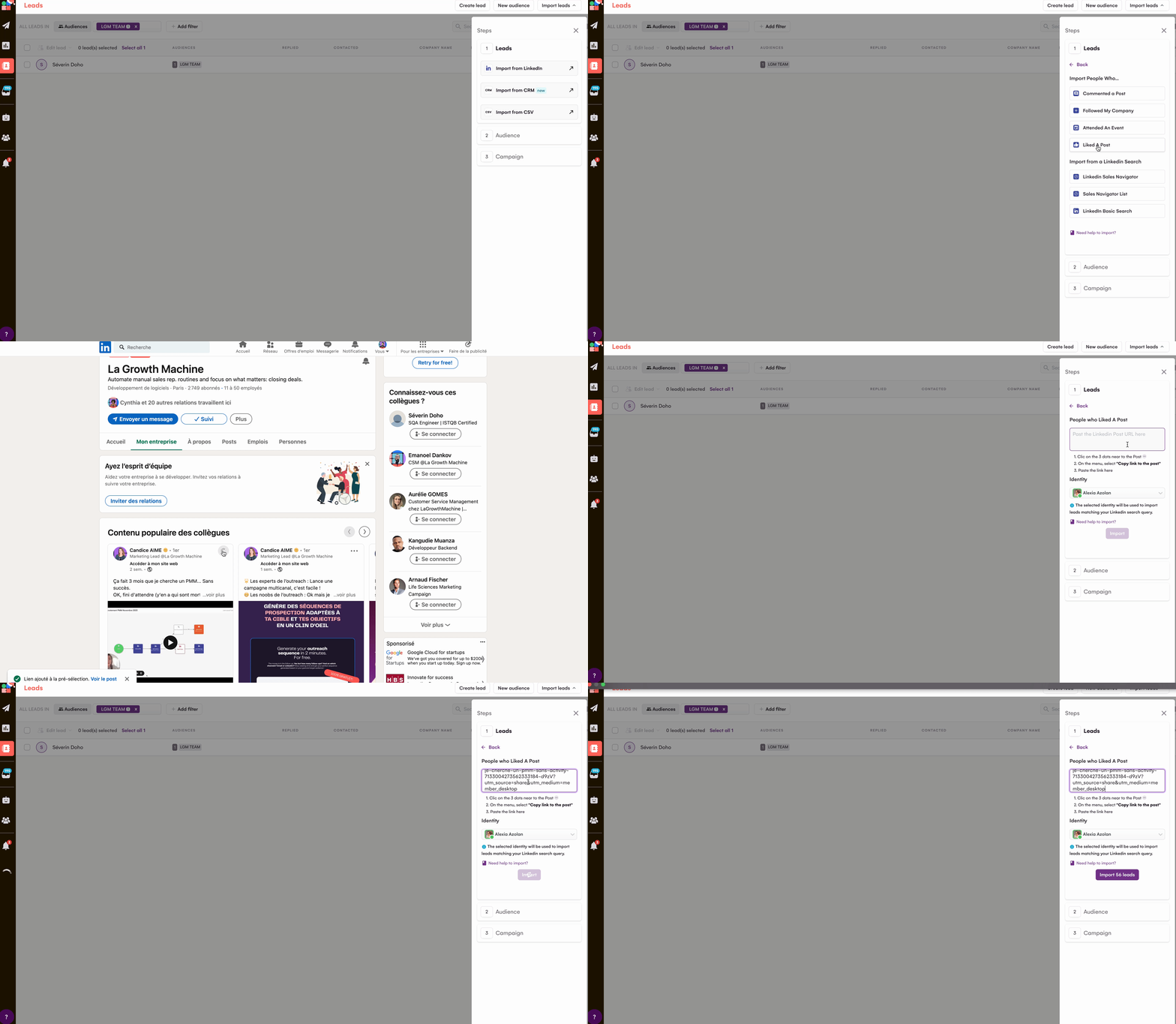
Today, with LGM, you can launch campaigns with just a few clicks targeting:
❤️ People who have liked a post (yours, an influencer's, or even a competitor's... oops). 💬 People who have commented on a post (you got it). 📅 Attendees of a webinar (whether you're participating in or organizing it). 🏭 Followers of your company page.
And the best part? It's super easy!
How does it work?
Connect your LinkedIn account to LGM.
Create a new audience by clicking on "Import from LinkedIn."
Select the source of the leads you're interested in:
Commented on a Post
Followed My Company
Attended An Event
Liked a Post
Follow the instructions (copy and paste the post link or select your company page, for example).
The list of people is imported into your audience.
La Growth Machine's Latest Innovation Will Leave You Voiceless
We now know that using voice messages leads to an average of 2.05 times more responses. Primarily because they allow you to stand out through:
👉 Genuine human connection 👉 The element of surprise due to their limited usage 👉 A sense of exclusivity that makes automation invisible
But we believe that campaigns can be even more effective with personalized voice messages.
Automate + Personalize, What's Better?
Many of you have mentioned it: voice messages are fantastic. Still, adding a touch of personalization would be the icing on the cake.
Thanks to AI, it's now possible. You address each lead by their first name, all automated.
How does it work?
1 + 2 = 3
1/ Select your introduction and a custom variable, and AI generates the audio using your own voice. 2/ You record the rest of your voice message. 3/ We combine the two messages for a personalized send to each lead. LGM Voice AI
This feature is available on all plans in beta version. It's an opportunity to test it out and form your own opinion 😉
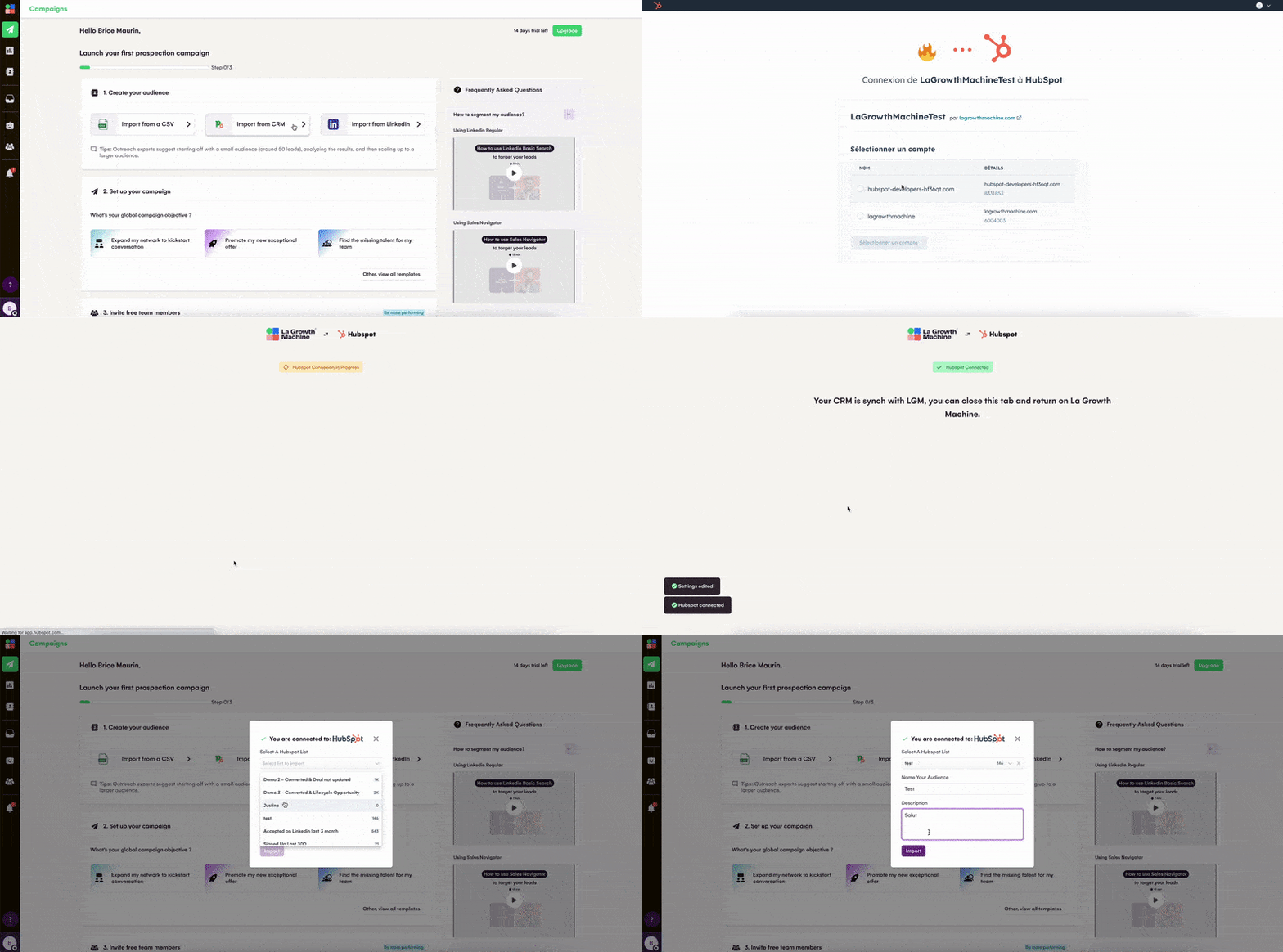
We totally get it – you've been rocking your CRM game, keeping your contacts updated and it can be a real drag having to export those CSV files just to import them again into LGM.
But guess what? Those days are gone! Now, you can import directly from your CRM. 👌
No more fussing around with CSV exports and imports – we're saving you time and energy from now on! 😉
How it works?
When importing leads into LGM, you can choose HubSpot or Pipedrive as your source.
Click on 'Import from CRM.
Your CRM is automatically detected; if it isn't, you need to connect your CRM in your settings.
Choose a list from your CRM to import.
You can import leads into La Growth Machine from the leads page or directly when you are creating a campaign.
Automatic Out Of Office Detection will save your summer... and more. ☀️
27% of the emails received by our users last summer were... Out Of Office emails. 😅 It's a significant portion of the messages received and it can mislead you about the performance of your campaign. We couldn't just leave you hanging like that! 🥵
This year, to ensure that you make the most of your summer, we are pleased to inform you that automatic Out Of Office detection is now available in LaGrowthMachine! 🎉
When an Out of Office email is detected, the next actions will be scheduled upon the lead's return, based on the date indicated in the email plus 3 days to allow them to settle back into their position.
How does it work?
It's so simple! Automatic detection of Out Of Office and rescheduling of all actions + 3 days are active starting the Pro plan. You can disable this function in your campaign settings.
👉 By unchecking the box, when LaGrowthMachine detects an OOO message, the campaign will stop for the lead detected as OOO (Out Of Office), but the messages will not be rescheduled.
To have a clearer understanding and enjoy your sunny vacation with peace of mind, Brice explains everything in this video: https://youtu.be/BZq4PTtFa50
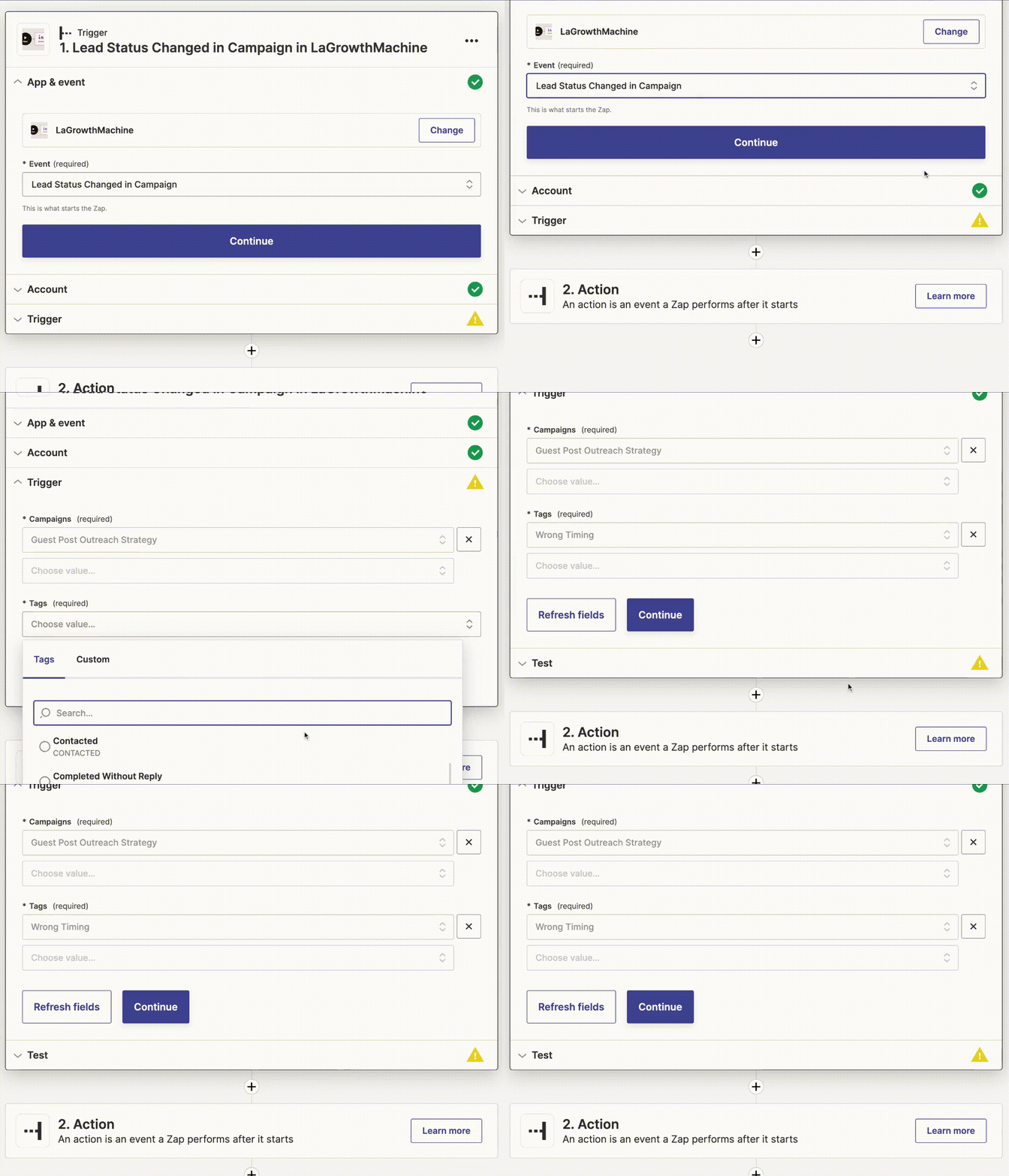
Harness the power of lead qualification in Hubspot and Pipedrive with the new Zapier trigger!
You've got it! We're thrilled that you're already familiar with the ability to qualify your leads using tags. It's a game-changer! 🔥
Now, let's take it up a notch. Syncing those valuable tags with your CRM is the next big step, and we've got just the solution for you. Our latest Zapier trigger enables you to effortlessly transmit this information directly to your CRM. You can get started right away and discover your tags seamlessly integrated into HubSpot or Pipedrive.
But hold on, there's even more good news! If you're not using the CRM's built-in sync or Zapier, but prefer using our APIs to push LGM information into your system, no worries at all! You'll be delighted to know that you can easily find the lead tag in our super handy "Update lead status" API. Happy tagging!
Just imagine the possibilities! 🤩 With lead qualification at your fingertips, you can create unlimited workflows.
Hey there! Noticed something different on LaGrowthMachine but can't quite pinpoint it? 👀
Well, it's all about the menu! 🎉
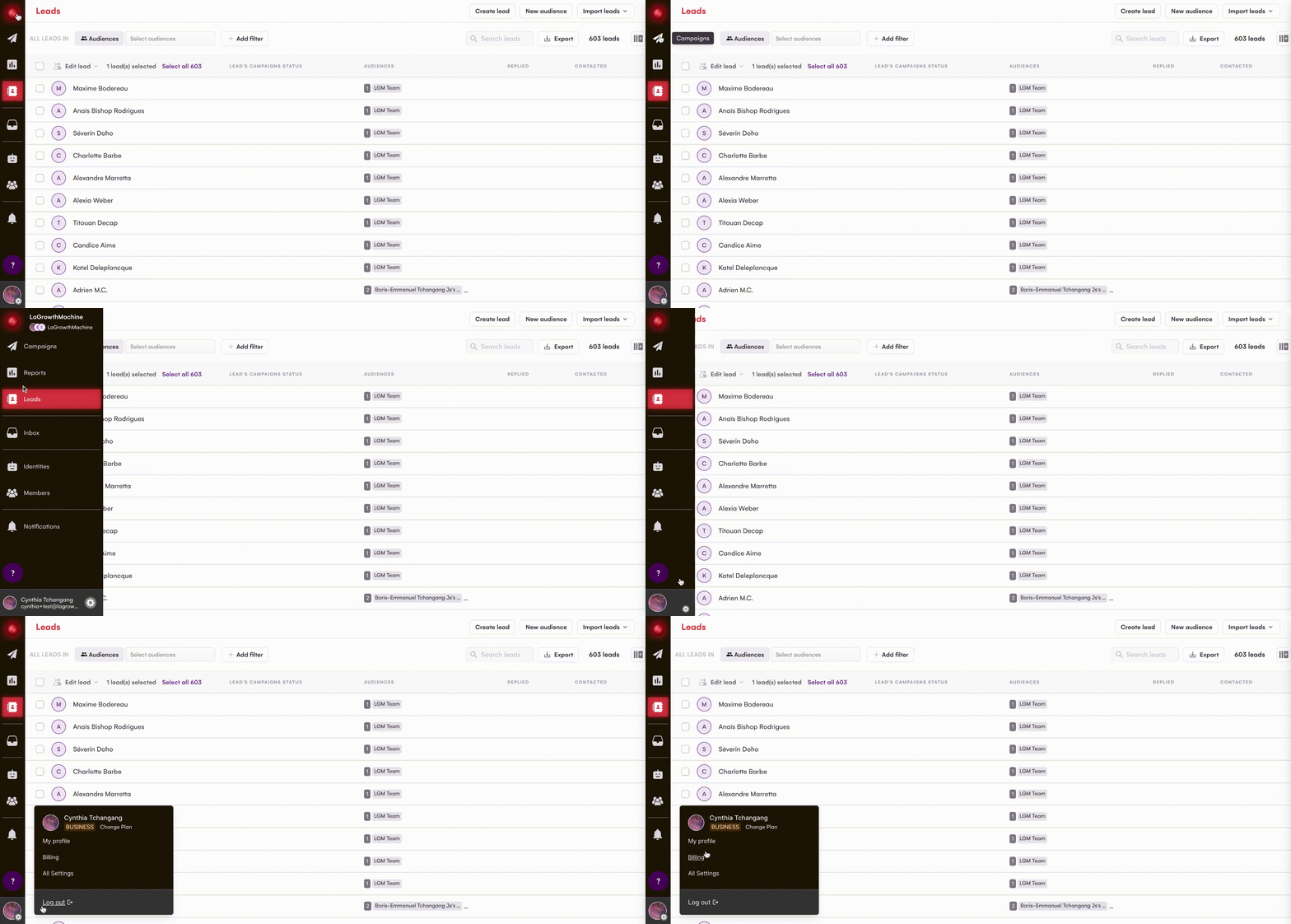
We've given the sidebar a makeover to make your life easier! Now, you'll have no trouble finding what you need. Your settings and invoices are just a click away when you tap on your photo. The best part? Logging out is a breeze too - simply click on your avatar. No more hunting around for that pesky logout button!
Add a lead to an audience easily from the lead sidebar 👌
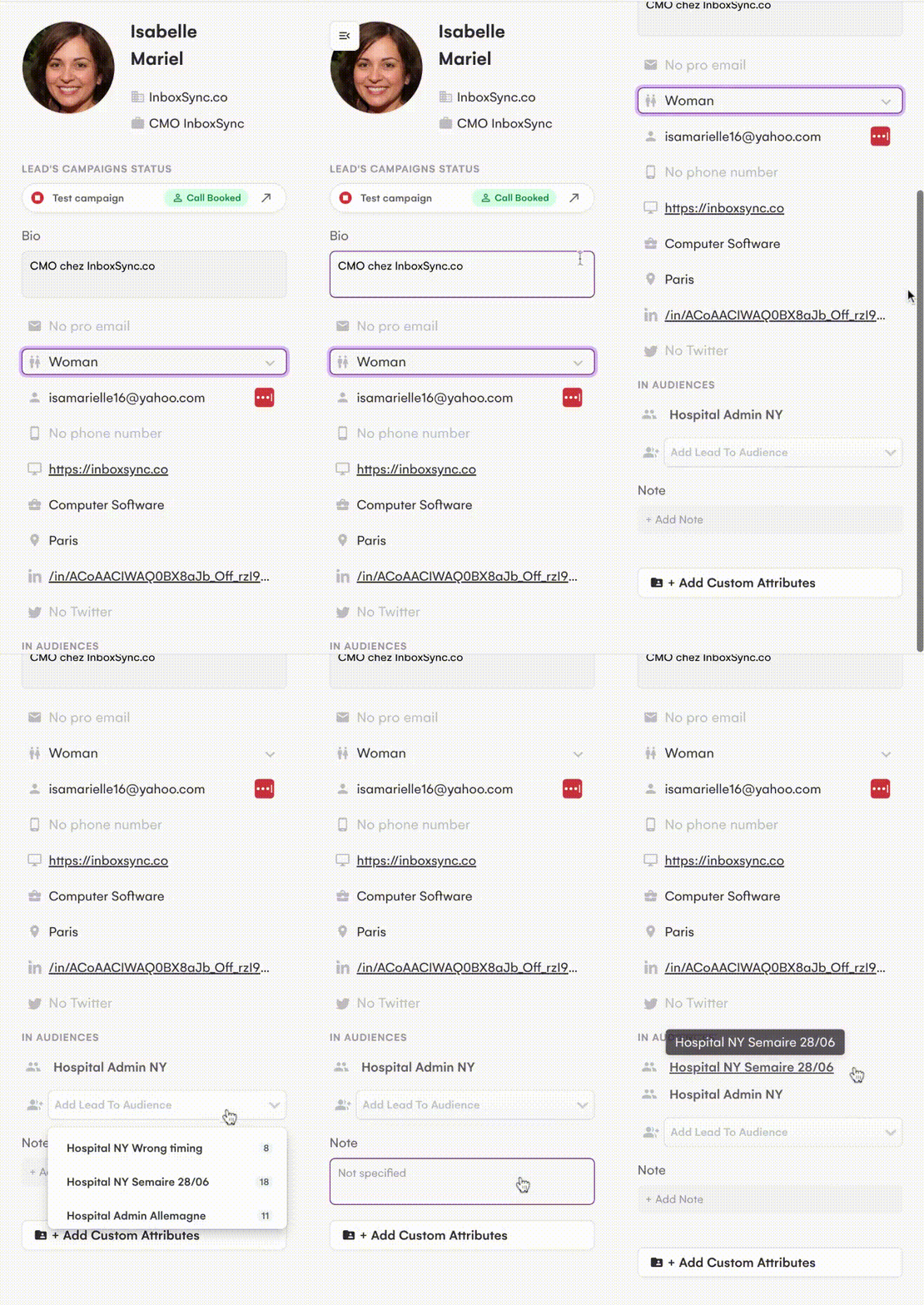
Available on the Campaign interfaces, the LGM messaging platform, and the Leads page, you'll find the lead sidebar.
It's a handy feature that displays all the important details about a lead, including their bio, email address, website, job title, and current audience. You can easily update this information or add a note, which is super useful for keeping track of important details. But hey, you already knew that! 😉
🤩 Now, here's the exciting news: you can add the lead to another audience directly from the lead sidebar! It's as simple as clicking on "Add lead to Audience" and choosing the audience you want.
This convenient feature allows you to launch a more tailored campaign for the lead or follow up with them in a personalized way. How cool is that? 😎
A new filter, 'Lead's campaign status' is now available 🎉
Qualifying leads is seriously awesome! 🤩 And you know what's even cooler? Being able to easily group them by status and instantly see what each category is all about.
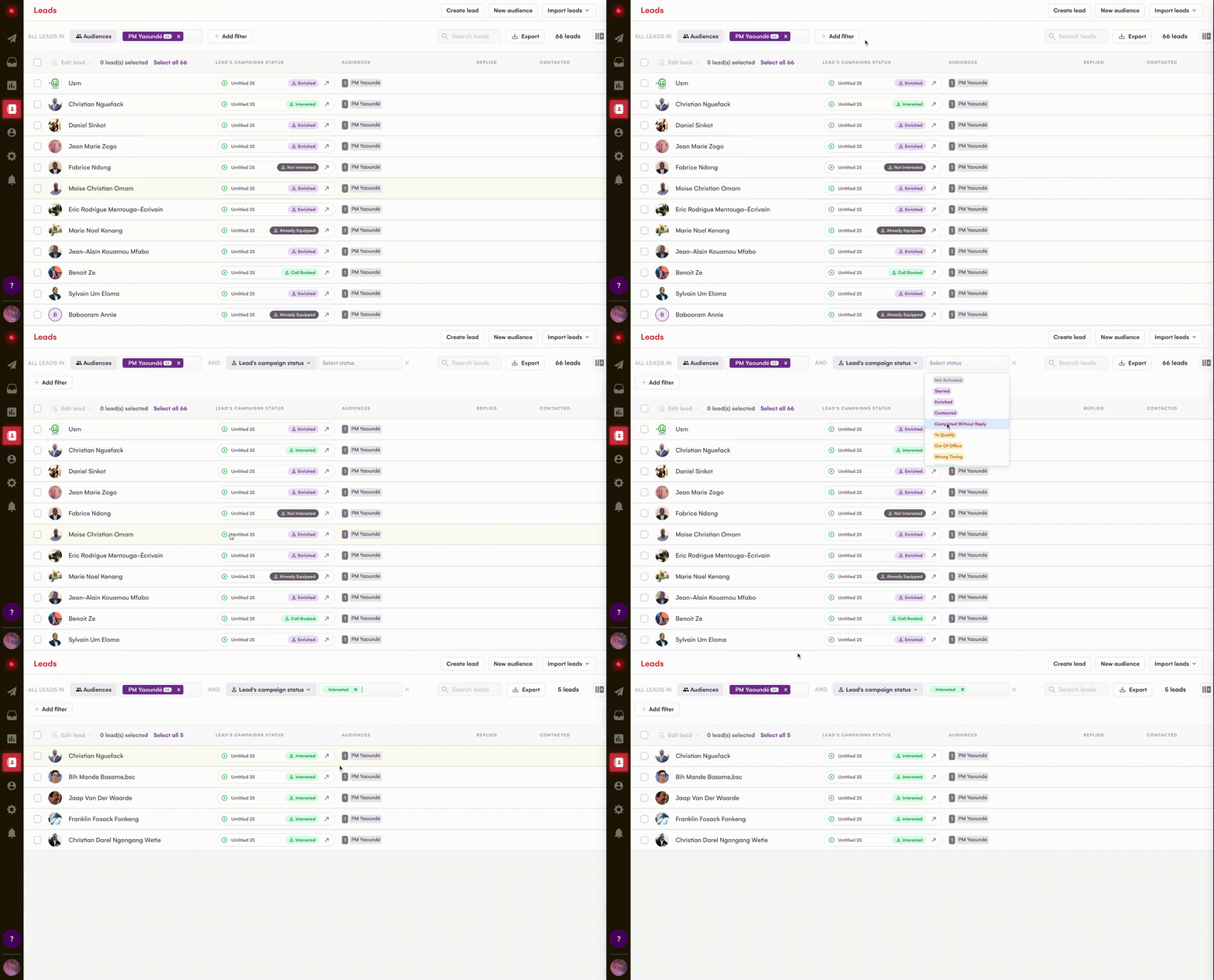
Here's the best part: LaGrowthMachine has got you covered! You can filter lead qualification tags right from the 'Leads' page. 👌
So, how does it work? It's a piece of cake! Just hop over to the 'Leads' interface, add a new filter, select 'Lead's campaign status,' and pick your desired tag. Voila! Your leads list will magically get filtered according to your query. Pretty smart, huh?
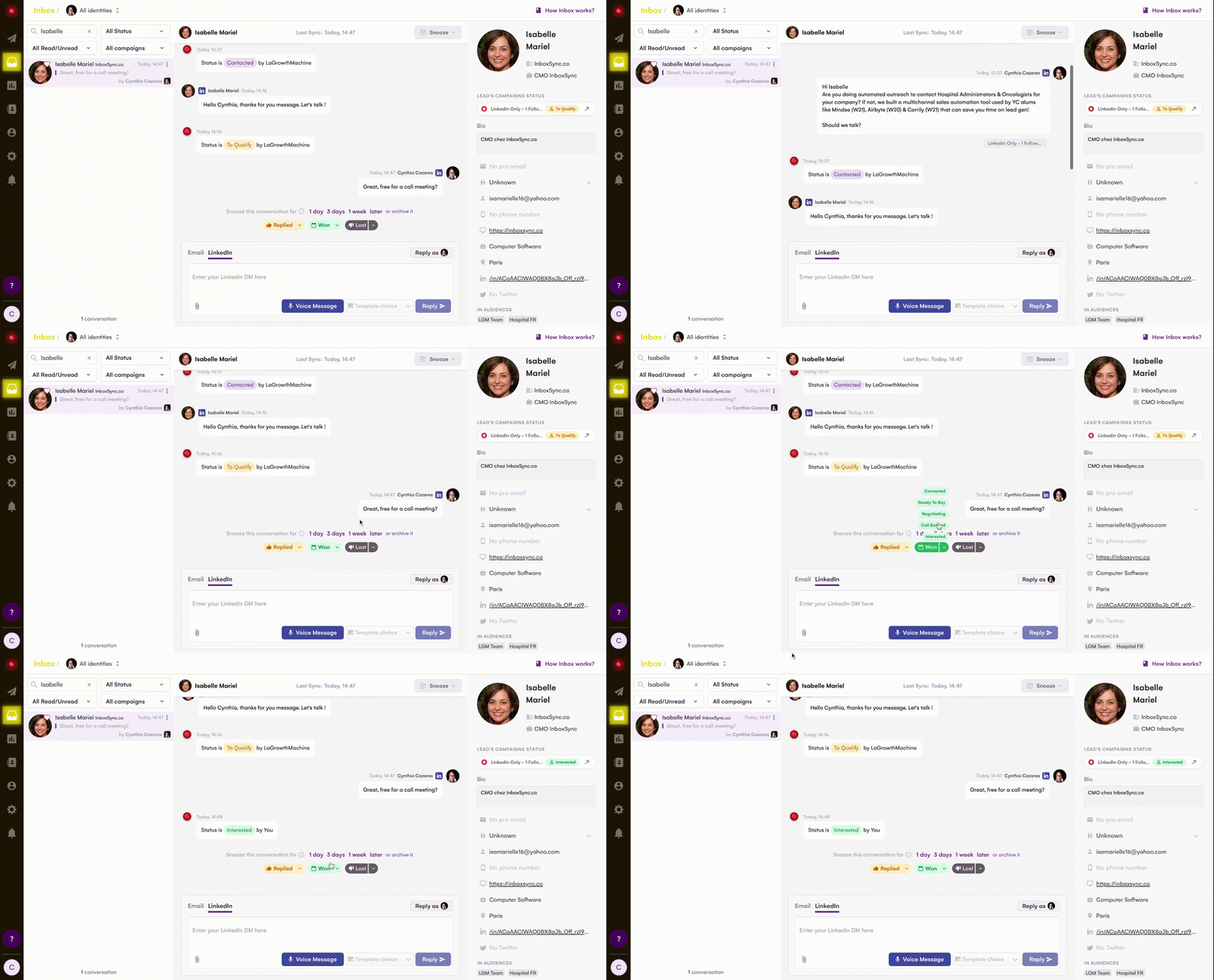
Qualify a lead directly from a message in the LGM inbox 👌
Here we are! 🔥
A few weeks ago, during LaGrowthRelease, we shared some exciting news with you. We introduced three fantastic updates, and one of them allows you to qualify your leads using tags, making it easier to measure and analyze the results of your campaigns. You could do this right within the « Campaign » interface.
The thing is, like 99% of people, you probably need to qualify a lead based on their response to one of your solicitations. So, we rolled up our sleeves and got back to work to make your qualification process even smoother.
Guess what? Now you can qualify the relevance of your leads directly from the LGM inbox! Isn't that amazing? 😍
How does it work? To qualify a lead from the inbox, it's very simple. Go to the conversation of your choice and select the tag that best corresponds to one of the categories: Replied, Won, or Lost. A list of tags will appear, allowing you to personally qualify the lead according to your criteria.
This feature is available starting from the PRO package. You will receive 💯 credits per identity. Need more credits? Contact support, apparently they're friendly...
.png)


 Powered by FeedBear